Thursday, October 3, 2013

When to use facesContext Redirect vs context Redirect + What I found in the bottom of my closet

I haven't had much useful to say lately.  I am just plugging along in my very large Purchase Order system project.   I think I have reached the point where I just want it done.  I know from experience that this means that I need to be extra careful to not cut corners and let my quality of work slip.  Today I did discover something worthy of sharing.

I discovered the difference between these two lines of code:

facesContext.getExternalContext().redirect("home.xsp");

context.redirectToPage("home.xsp");

On the surface they appear to do the same thing, but here is the difference.   The first one will continue evaluating the rest of the code before redirecting.  If that code happens to encounter a second redirect you will get an error that in Chrome looks like the following.


The second line will redirect the page immediately and you won't get the error.   I imagine that this has something to do with the JSF lifecycle if I had to guess.   If anyone wants to further elaborate then please comment.

Speaking of the JSF lifecycle, I think I am now ready to rewatch and this time understand the Xpages Masterclass.   I have watched at least the first two videos before, but honestly I wasn't ready for them.   I watched them back when they came out in the Spring and I really tried to understand, but mostly my eyes glazed over.  (Let me add my not understanding the material in no way reflects the quality of the presentation).  In my opinion, unless you are a genius this course won't help you much until you have gained some heavy real world xpages experience.  I will be diving into them soon.

Look what I found in my closet, who remembers these?

Lastly, I would like to join chorus in thanking Bruce Elgort.  I don't think I have ever met him personally but I have most definitely benefited from his efforts in the Notes community.   Thank you Bruce!

Thursday, September 12, 2013

Creating an Event for the Selected Row in an Xpages Data Table

Summary:

In this post, I wanted to show how I allow the user to select and act upon a whole row in a data table.   All the user has to do is single click on the row to make something happen.  I find that this works nicely for a desktop and especially nice for mobile users.

Attribution:

I discovered this method by following the advice of this post from Inner Ring Solutions.  I wouldn't have known that you can do this without their help.  This post will cover my own implementation of this technique.

Usage:

In my current project, it made a lot of sense to use a data table to display a list of line items.  I could have used a repeat, or a view control, but ultimately decided on the data table.   This works best when there is only one item to select, and you want to treat the whole row as a single unit.   After I created and styled my data table, I was surprised to discover that there were no events associated with individual rows.  The only events are associated with the table as a whole.  I thought I would have to switch to a view control, but then  I discovered the blog post from Inner Ring Solutions.
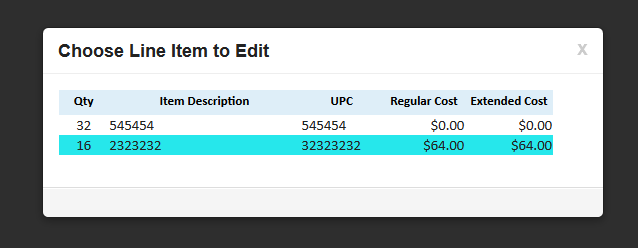
The user selects a single row, the mouse cursor (not shown) is on the second row.

How I did it:

The key to making this work using a property called "rowAttrs".   The name implies attributes applied to a row, but using this technique you can actually make an event  applied to a row.

This is the property that you use to apply to the whole row.
The really strange thing about using this property is that you cannot (at least I couldn't) use the script editor to enter a value.  When I tried to use this I would get compile time errors because it creates a different source. You can however use the source pane or enter text in the value.  It is important to give the 'attribute' a name of "onclick".  This how the server knows that this is an event.

Code must be entered in text in the value, you cannot use the Script Editor
In order to reference the selected row, you will need to enter a value in the "var" of the Data Table.  I enter the value of "line_items" as highlighted in the code sample.

The essence of what is happening here is that you can access backend data and pass it to a client side function.   In a alternative usage of this, in addition to passing a value from the current row, I also passed the value of a scoped variable.  

The last piece of this is the client side function.  I created this inside an output script control.  If you are new to xpages, this core control is not in the pallet by default, and can be found by choosing 'Create | Other'.  It holds clientside javascript you want to be loaded on this page.   I could have also used a clientside java library.

Opens the selected document

Alternate Uses:

This example uses the same method to delete a line item.   The function uses an AJAX call in jQuery to delete the document and then redirect the page in the call back.  (yes, I am quite proud of figuring this one out)
Deletes selected document
This example passes values to and calls an xAgent which in turn calls a java method, and then redirects the page using the value I pass in.   
Calling an xAgent and passing values to it

Conclusion:

I found this method very useful in cases, where you only want to select one row, and you want to minimize clicks or touches.   It has been very well received by the users I showed it to.   I haven't experimented with creating other events, but would think that "onclick" isn't the only one.  

Friday, August 23, 2013

view.postScript() only works for certain events on an Xpage

I discovered an undocumented feature today when trying to use the view.postScript() method.  This method (added in 8.5.3) allows you to run client side JavaScript at the conclusion of a block of server side JavaScript.  I discovered this issue, when I moved some code in the onClientLoad event of a Panel from clientside to serverside.   I needed to reference a value on the current document, and run a different function based on the value.

I thought to myself, "no problem, I will just use view.postScript() and it will run fine."   When I test the code, nothing happens.   The script never runs, and there are no errors.  I checked Firebug and the scripts loaded fine, as in I was able to launch them using the JavaScript console.  At that point, I did some googling and didn't find all that much out there on view.postScript().   I found a few articles, but nothing that helped me with my problem.

I then turned to Stack Overflow.  Sometimes, just the act of trying to write a question as clear as possible will cause me to think of the answer before I even post the question, but not this time though.  I went ahead and posted this question.

After I posted I got to thinking that maybe it wasn't my logic, but just that the code was being ignored.   I created a alert message using view.postScript and it still did not work.   I then tried putting that alert in the afterRenderResponse event of the xpage, where I had some other code.   Nothing happened there either. Frustrated, I then started putting the code in all the events, and to my surprise it worked some places and not others.  

Basically, the view.postScript() method only works in certain events.   I do not know why this is, but if I had to guess it has something to do with the JSF lifecycle.

I did some experimenting with the Xpage events and here is what I found.

  1. onClientLoad = nothing
  2. beforePageLoad = XSP error
  3. afterPageLoad = WORKS!
  4. afterRestoreView = nothing
  5. beforeRenderResponse = WORKS!
  6. afterRenderResponse = nothing
I can tell you that it doesn't work in the only Panel event, onClientLoad.  I am pretty sure I have used it with onClick events before, so it does work there.

The bottom line is when you view.postScript(), and you should, be aware that, if it does nothing then you might be using it in a place where it isn't supported.   In that case, first try a simple alert, and if that works then it is your code, if it doesn't then you can't use view.postScript in that event.   In my case, I moved the code to afterPageLoad and it worked great.