Monday, November 11, 2013

Creating a PDF dynamically from an XPage - Part 1

In my Purchase Order project, one of the features I promised to the users would be a professional looking document instead of a printed web page.   Of course this was very well received by the users.  I felt comfortable suggesting this feature because I have previously watched videos showing that it could be done.

The demos that I had watched had one thing in common, they all showed how to create a PDF from a view. In my case, I need to create a single Purchase Order from the contents of an Xpage.  The Xpage that is the PO, actually shows header items stored in one document, and line items which are each stored in separate backend documents. There is an indeterminate number of line items associated with any given PO.   I quickly discovered that this piece of the project will not be easy, and in fact will be time consuming and difficult.  

In this post, the first of a series, I will document the steps to prepare to create PDF's from an Xpage.  The first step you will need to decide is which method to go about this.  The second step is to do your homework and understand the technique you decided to use.

Step 1: Deciding which technique to use.  

There are three distinct technologies available for creating PDF's.  The first is using an FDF file.  My friend Mark Roden was kind enough to give me an overview of this technique.   It seems like it is the easiest solution to create a PDF, but it does have some limitations.   You would use Acrobat (paid version) to create a form and then create a FDF file from your application to tell which data to be placed in which field on the acrobat form.   The format of the FDF is structured file that is neither XML or JSON, but seems pretty easy to pick up.

The limitation is that you would have to know that the number of fields that you need prior to creating the PDF.   In my case, a PO can have any number of line items, so I felt like using this technique would be too limiting.  If you can, I would recommend using this technique for how easy it is.  The techniques below are very different and more time consuming.

The second technique is to use iText.  I watched an older Notes in 9 video on using iText by Brian Moore. The video was very well done, and is a much watch if considering using iText.   I decided to forgo using iText because most of the more recent demonstrations that I found used Apache FOP instead of iText.  

This brings me to the third technique on creating PDFs, XSL-FO using Apache FOP.   My research led me to know that this was my best path to accomplishing my goal.  


Step 2:  Understanding how to use the XSL-FO and Apache FOP

The two resident experts in the Xpages world on using XSL-FO are Stephan Wissel and Paul Calhoun. Stephan has produced a series on his blog on how to use XSL-FO, it is must reading.    Paul has created an Notes in 9 that in 15 minutes or so shows you how to create a PDF from a view.   Paul also includes links to his demo on his site for all to use. 

The other useful site that I helped me was good ole w3schools.com.   They have whole sections dedicated to XSLT, XSL-FO and XPATH.  You will need to understand these 'languages' to create PDF's.   You will find yourself learning far more about XML than you ever cared to know.  Best to start brewing a fresh pot of coffee before diving in.

Next Post

In Part 2 of this series, I will document the pitfalls I encountered while trying to get a working proof of concept.  I also want to add that I am still plowing through all this, and I welcome in the comments any corrections if I say anything wrong. 

Thursday, October 3, 2013

When to use facesContext Redirect vs context Redirect + What I found in the bottom of my closet

I haven't had much useful to say lately.  I am just plugging along in my very large Purchase Order system project.   I think I have reached the point where I just want it done.  I know from experience that this means that I need to be extra careful to not cut corners and let my quality of work slip.  Today I did discover something worthy of sharing.

I discovered the difference between these two lines of code:

facesContext.getExternalContext().redirect("home.xsp");

context.redirectToPage("home.xsp");

On the surface they appear to do the same thing, but here is the difference.   The first one will continue evaluating the rest of the code before redirecting.  If that code happens to encounter a second redirect you will get an error that in Chrome looks like the following.


The second line will redirect the page immediately and you won't get the error.   I imagine that this has something to do with the JSF lifecycle if I had to guess.   If anyone wants to further elaborate then please comment.

Speaking of the JSF lifecycle, I think I am now ready to rewatch and this time understand the Xpages Masterclass.   I have watched at least the first two videos before, but honestly I wasn't ready for them.   I watched them back when they came out in the Spring and I really tried to understand, but mostly my eyes glazed over.  (Let me add my not understanding the material in no way reflects the quality of the presentation).  In my opinion, unless you are a genius this course won't help you much until you have gained some heavy real world xpages experience.  I will be diving into them soon.

Look what I found in my closet, who remembers these?

Lastly, I would like to join chorus in thanking Bruce Elgort.  I don't think I have ever met him personally but I have most definitely benefited from his efforts in the Notes community.   Thank you Bruce!

Thursday, September 12, 2013

Creating an Event for the Selected Row in an Xpages Data Table

Summary:

In this post, I wanted to show how I allow the user to select and act upon a whole row in a data table.   All the user has to do is single click on the row to make something happen.  I find that this works nicely for a desktop and especially nice for mobile users.

Attribution:

I discovered this method by following the advice of this post from Inner Ring Solutions.  I wouldn't have known that you can do this without their help.  This post will cover my own implementation of this technique.

Usage:

In my current project, it made a lot of sense to use a data table to display a list of line items.  I could have used a repeat, or a view control, but ultimately decided on the data table.   This works best when there is only one item to select, and you want to treat the whole row as a single unit.   After I created and styled my data table, I was surprised to discover that there were no events associated with individual rows.  The only events are associated with the table as a whole.  I thought I would have to switch to a view control, but then  I discovered the blog post from Inner Ring Solutions.
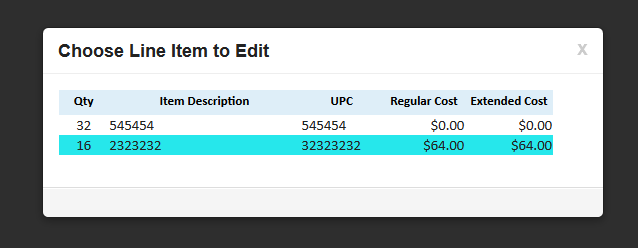
The user selects a single row, the mouse cursor (not shown) is on the second row.

How I did it:

The key to making this work using a property called "rowAttrs".   The name implies attributes applied to a row, but using this technique you can actually make an event  applied to a row.

This is the property that you use to apply to the whole row.
The really strange thing about using this property is that you cannot (at least I couldn't) use the script editor to enter a value.  When I tried to use this I would get compile time errors because it creates a different source. You can however use the source pane or enter text in the value.  It is important to give the 'attribute' a name of "onclick".  This how the server knows that this is an event.

Code must be entered in text in the value, you cannot use the Script Editor
In order to reference the selected row, you will need to enter a value in the "var" of the Data Table.  I enter the value of "line_items" as highlighted in the code sample.

The essence of what is happening here is that you can access backend data and pass it to a client side function.   In a alternative usage of this, in addition to passing a value from the current row, I also passed the value of a scoped variable.  

The last piece of this is the client side function.  I created this inside an output script control.  If you are new to xpages, this core control is not in the pallet by default, and can be found by choosing 'Create | Other'.  It holds clientside javascript you want to be loaded on this page.   I could have also used a clientside java library.

Opens the selected document

Alternate Uses:

This example uses the same method to delete a line item.   The function uses an AJAX call in jQuery to delete the document and then redirect the page in the call back.  (yes, I am quite proud of figuring this one out)
Deletes selected document
This example passes values to and calls an xAgent which in turn calls a java method, and then redirects the page using the value I pass in.   
Calling an xAgent and passing values to it

Conclusion:

I found this method very useful in cases, where you only want to select one row, and you want to minimize clicks or touches.   It has been very well received by the users I showed it to.   I haven't experimented with creating other events, but would think that "onclick" isn't the only one.