Wednesday, August 20, 2014

Trouble Using the Jar Design Element in XPages

It has been a while since posting, I have not forgot about blogging, but really have not done anything blog worthy.  In one of my projects, we have to talk to a mainframe application (not the tables) and perform various tasks.  The mainframe connection is made through Hostbridge technology, and packaged for me by our java developer in a jar that I can interact with using the java beans I use for business logic in my application.

As we are in proof of concept mode, the java developer sends me the jar every time he makes a change and I place it in my NSF using the new Jar design element. Unfortunately, so far it hasn't been as easy doing this as I expected.  I dropped the jar file in, and then was able to write code to call the public methods using the java bean.  So far so good, after adding the proper imports the code compiled fine.

At runtime, it would choke and give me a NoClassDefFoundError exception. This of course is really confusing because to me, the time to decide that you can't find the class should be compile time. I tried several times cleaning and rebuilding the application before turning to Stack Overflow with this question: http://stackoverflow.com/questions/25371817/the-contents-of-jar-file-not-found-using-jar-design-element-of-designer-9

I recieved two helpful answers from Stephan Wissell and Frantisek Kossuth.  The first thing I tried was removing the application, re-adding and verifying the build path which Stephan suggested.  This worked, and I was able to continue on without getting the same exception.

The next day it was necessary to change the package name we were using inside the jar.  I was able to fix my own java code by correcting the import and again it compiled fine.  Unfortuately at runtime,  I started getting the same NoClassDefFoundError exception again.  This time nothing I tried worked.  I spent a long time checking build paths, and trying to use the WebContent/WEB-INF/lib instead of the jar element.  I did discover along the way that the jar element actually places the file in the the lib folder on its own.  I also discovered that the Package Explorer makes it appear that the file is not there, but if you use the Navigator instead you can see that the jar file is present in that folder.

Franitisek in his answer, linked to another Stack Overflow question, one that I discovered before I asked my question.  In that question, the person who answered Panu Haaramo made a comment on his answer directing the OP to this blog post: http://lotusandjava.blogspot.com/2012/10/xpage-javalangnoclassdeffounderror.html

In this post, the author remarked that the only thing that worked was renaming the class.  So instead of renaming any classes, I decided to rename the jar file using the right-click menu option rename.  I did not rename using the O/S or have the java developer send me a new jar.  To my amazement, this worked, and the exception went away and I am now back in business.  I probably spent at least 4 hours at work today struggling with this issue, so I am hoping this post will save someone that trouble.

The bottom line

If you are getting a NoClassDefFoundError exception and using jars, try renaming the jars using the right click menu. It is easy, and it just might work. (You can always rename them back later, although I haven't actually tried that yet)

If someone at IBM sees this post, this might be something to look into fixing in the next release. :)


PS.  I am looking forward to attending MWLUG next week, hope to see some of you there.

Tuesday, June 24, 2014

Integrating Datepick.js into your XPage

No, Datepick.js is not another Javascript framework; it is simply a super awesome jQuery plug-in that I recently discovered, and put to use in my latest XPages project. 

There are many calendar plugins to use with jQuery.  Here is an article where someone decides which are the top ten. I entertained using some of these, specifically #1 and #6 in the list, until I discovered "jQuery Datepicker" by Keith Wood, which for some reason was not on this list. Once I discovered this one, I knew straight away that my search was over.  In this post, I will show you how I used jQuery Datepicker (datepick.js) within an XPage. 

Generally, this calendar is used like most datepickers, where it is shown via a button and then hidden again. However, i
n my use case, I wanted a full month calendar that was always visible in the left side navigation as shown below.  Below is the 'finished' result.

This is the finished result. The random number is there so I know it refreshes, but later will be meaningful content.


How I made it work

The first step is to download the source and copy it to your WebContent folder in your application. I recommend creating a "js" subdirectory and placing the files in there.  You then need to reference the files in your XPage using the <script> tag.

Step 1:  Download and add to page

The second step is to create a place to put the calendar and give it a class. I created a panel and gave it a class of ".calHere". 
Step 2 - Add a class where to put the calendar
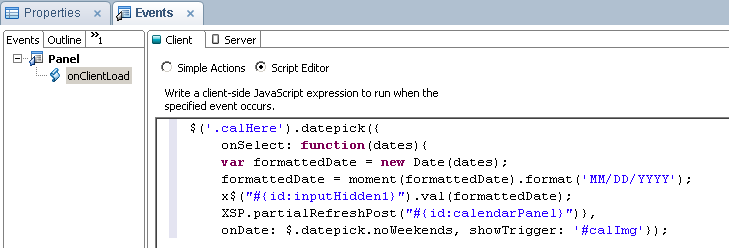
The third step is to create code to launch and process the calendar.  In the onClientLoad event of the panel, I have the following code. 
Step 3 - Format the calendar and figure out what to do with result

Code Explanation 

First it launches the calendar, and then assigns a function to the calendar's onSelect event.  Finally, it also prevents the user from selecting weekends, which is something in my specific requirements.   

Here is how I went about updating the backend data with the value selected in the calendar:
  1.  I first format the Javascript Date using moment.js, as very useful utility for all things time.
  2.   Then update a hidden input control in the content panel with the formatted date.  I make use here of Marky Roden's X$ function for selecting Domino ID's in jQuery.
  3.   Lastly, I force a partial refresh of the content panel using the built-in XSP object.
I am very pleased with how this came out.  I highly recommend that everyone at least become aware of Keith Wood's jQuery Datepicker.  The datepicker has every imaginable way that it can be customized both in functionality and style.  I wish I discovered this a long time ago.   

Monday, June 9, 2014

Force your expired XPage to return to the login page

One of things that I have found annoying about XPages apps is that an application page left open in the browser for a long time will act like it is usable, but in fact the session has timed out and the page is unusable. When you try to actually submit anything the page will fail, and you will have to re-login.  I work for a bank now, where they are very concerned with security so I wanted my application to work similar to most financial websites.  In addition, I find a page you can't use a very poor user experience.  I had some time while the project is ramping up, so I decided to do something about it.

In this post, I will go over a simple way to force the page to redirect to the login page after the session expires.  I was actually surprised when I researched this that I couldn't find anyone who had already done it.  I put this Stack Overflow question in, and Stephan Wissel answered it and pointed me in the right direction.  He reinforced what I suspected that I would have to do this entirely in the client.

What does it do, how does it work

The concept here is pretty simple, when you load a page it sets a timer.  Whenever you submit anything to the server, or switch tabs in the application the timer is reset.  The timer accepts two parameters, the time to wait, and the page to redirect to.  The function does NOT log you out, that is what happens automatically by the server, this simply makes the client aware of what already happened.  In my case, I redirect to the application home page, so that after the login is re-entered it goes where I want it to.  It would be easy to just make the function refresh the current page.

var timeoutID; 
function setAutoRefresh(refreshTime, relativePath) { 
        if(timeoutID){ 
                window.clearTimeout(timeoutID); 
        } 
        timeoutID = window.setTimeout(function(){ location.replace(relativePath);}, refreshTime); 
} 


The same function will work for setting and resetting the timer.   Not sure why you would, but if you wanted to, you could have any number of timeouts on a page by giving them different variables.

You call the function like this:
var pathArray = window.location.pathname.split( '/' ); 
var path = "/" + pathArray[1] + "/" + pathArray[2]; 
//returns relative path to application home, example: "/atm/atm.nsf" 
//1860000 represents 31 minutes, one minute after session timeout 
setAutoRefresh(1860000, path); 

I made my timer set to one minute after the default 30 minute session logout.  The way this is written now, if the time was set less then it would redirect to the page and skip the login page which to me defeats the purpose. One warning, if you miss resetting the timer then the page could redirect unexpectedly.  In my application, I call the function from the onClientLoad of my layout custom control once and then in each button that perform updates. Note:  If you are not using a layout custom control, then you will have to put this in the onClientLoad of every XPage.  

Potential Enhancements

The code I wrote is pretty basic, maybe too basic.   Here are a two ways that you could make it more robust:
  • When the timer is up, you could create an ajax call to ping the server, and then redirect the page if you get returned a "Not Authorized" message.  If the session is still active you could reset the timer.  With this method, you could load it once, and just have it run every ten minutes, and never have to worry about it.  
  • Another enhancement, would be not reset the timer when you switch tabs or submit anything, but instead reset if based on a mouse moving event.  I considered this but thought it overkill for the application I am writing and didn't want to be calling the function non-stop. 
If anyone had any better ways of doing this, or anything to add, please comment.


August 2016 Edit:  


For some strange reason David Leedy is unable to comment on my blog so I am adding his comment here.

I'm adapting this code for my day job and also a future MWLug presentation and maybe even NotesIn9. I had problems with the code as it seemed to hardcode in the level of folder nesting. I ended up using this:
var thisUrl = window.location.href;
var lastSlash = thisUrl.lastIndexOf("/");
var dbPath = thisUrl.substring(0, lastSlash);
var finalPath = dbPath + "?Logout&redirectto=" + dbPath + "/sessionExpired?OpenPage";


console.log("dbPath : " + dbPath);
console.log("FinalPath : " + finalPath);

//1 minute = 60,000 milliseconds
setAutoRefresh(60000,finalPath); 

Thanks to both you Steve, and Daniel for this post and comment!